
What if the “mint condition” iPhone 17 you just found for a bargain price is actually a “Frankenphone” assembled from incompatible, third-party parts? Buying a pre-owned device in South Africa is a brilliant way to save thousands of Rands, yet the process often feels like a high-stakes gamble. You likely worry about hidden hardware faults, blacklisted serial numbers, or whether that “refurbished” label actually carries any weight. Learning exactly how to check used phone condition before buying is the only way to protect your hard-earned money and ensure your new device doesn’t become an expensive paperweight.
We believe that high-quality technology should be accessible and reliable for everyone. This guide provides a professional multi-point inspection routine to help you identify genuine components and verify a device’s internal health. You’ll learn how to test for iOS 26.5.1 compatibility, check battery cycles accurately, and use local databases to confirm a phone hasn’t been reported stolen. We’ll provide a clear, step-by-step verification process that covers everything from screen digitiser health to the latest “parts pairing” issues found in 2026 hardware.
Key Takeaways
- Learn why the first 60 seconds of a physical appraisal are vital for distinguishing between minor cosmetic “pocket wear” and serious internal impact damage.
- Master the “White Background” test to identify OLED burn-in and backlight bleeding before committing to a device with a faulty, expensive-to-replace display.
- Understand how to check used phone condition before buying by using the *#06# command to verify the IMEI against South African blacklists and network locks.
- Discover the critical differences between the risks of private sales on platforms like Gumtree and the security provided by professional trade-in devices.
- Identify the software red flags to watch for, including activation locks and degraded battery health that can compromise the performance of modern hardware.
The Initial Physical Appraisal: Spotting External Red Flags
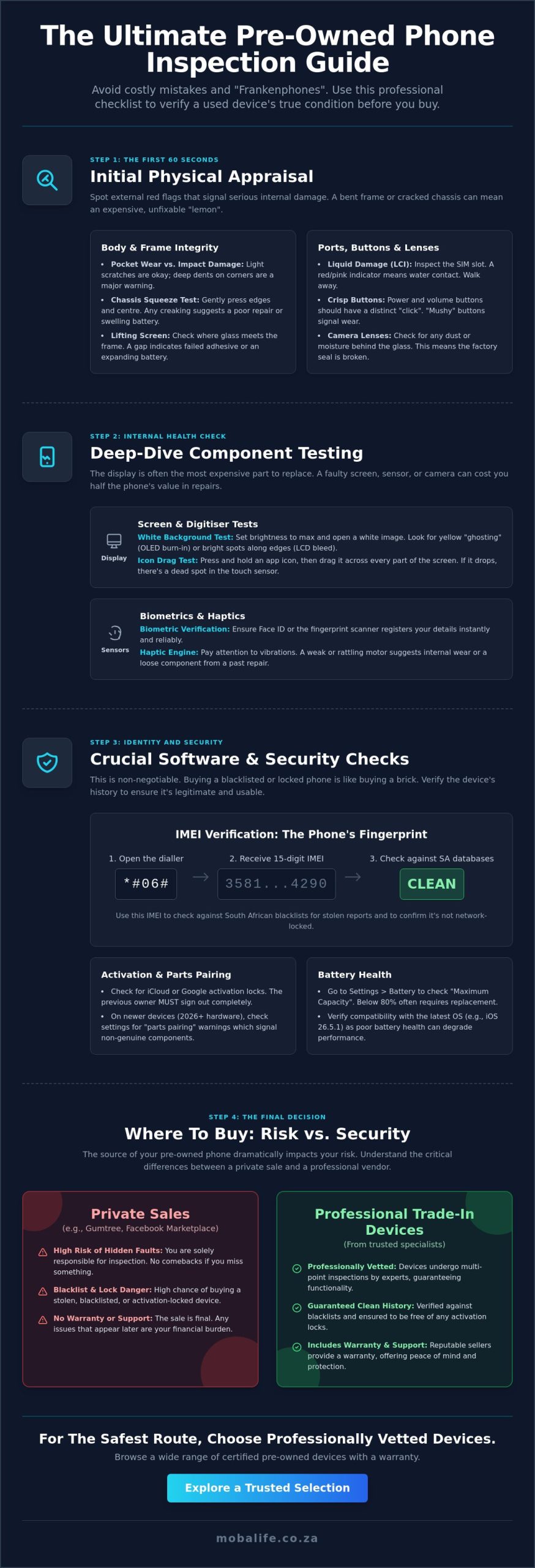
The first 60 seconds of your inspection are the most critical for your wallet. If a device has structural damage, no amount of software troubleshooting will save you from a massive repair bill later. Missing a bent frame or a hairline crack in the chassis can lead to a “lemon” that costs thousands of Rands to fix. Understanding what to know about smartphones and their structural assembly is essential before you start poking at the software. This initial phase of how to check used phone condition before buying prevents you from wasting time on a device that is fundamentally broken.
You must learn to differentiate between cosmetic “pocket wear” and “impact damage.” Light scratches on the aluminium or glass are normal for a pre-owned device; they don’t affect the performance. However, deep dents on the corners indicate a high-velocity drop. These impacts often vibrate through the internals, loosening delicate ribbon cables or micro-soldered components. Use the “Chassis Squeeze” test by applying firm, gentle pressure to the edges and centre of the phone. If you hear creaking or feel the screen shifting, it usually suggests a poor third-party repair or a battery that’s beginning to swell. This simple physical check is a cornerstone of how to check used phone condition before buying effectively.
Water damage is another silent killer you can often spot whilst the phone is still powered off. Inspect the SIM tray slot for the Liquid Contact Indicator (LCI). In most modern devices, this small sticker turns bright red or pink if it has touched water. If the port looks fuzzy or has green corrosion, walk away immediately. Moisture trapped inside will eventually corrode the logic board, leading to a total device failure that is rarely covered by any form of private “handshake” warranty.
Inspecting the External Body and Screen
Look closely at the edges where the glass meets the frame. A “lifting” screen is a major red flag, often indicating that the adhesive has failed or an aftermarket battery is expanding. Check the charging port with a torch; bent pins or packed-in lint can prevent fast charging or data transfers. Finally, examine the camera lenses from various angles. Any internal dust or moisture behind the glass suggests the factory seal is breached, which will ruin your photos and expose the internals to the elements.
Testing Buttons and Tactile Feedback
Every physical input should feel crisp. Press the volume and power buttons to ensure they have a distinct, audible “click” sound. If they feel “mushy” or stuck, the internal switch is likely worn out or clogged with debris. On iPhones, flick the silent toggle multiple times; it should register instantly without you having to wiggle it. Most importantly, verify the biometric sensors. If the fingerprint scanner or FaceID fails to register your details instantly, the module might be damaged. These parts are often cryptographically paired to the motherboard, making them incredibly expensive to replace through official channels.
Deep-Dive Component Testing: Screens, Cameras, and Sensors
Once you’ve cleared the physical body, it’s time to inspect the internals. The display is often the most expensive component to replace on modern flagships. If you buy a phone with a faulty panel, you might end up paying nearly half the device’s value just for a screen swap. This is why mastering how to check used phone condition before buying requires a methodical approach to component testing.
To spot OLED burn-in or backlight bleeding, open a pure white image and turn the brightness to maximum. Look for “ghosting” or faint yellowing, which often appears in the status bar or navigation areas. This is particularly common on older OLED panels. For LCD screens, look for bright spots along the edges; these suggest pressure damage or backlight bleeding that will only get worse over time.
You must also verify the digitiser. Long-press an icon and drag it across every millimetre of the touch surface. If the icon “drops” at any point, that area has a dead spot. Whilst testing, pay attention to the haptic engine. A rattling or weak vibration motor suggests internal wear or a loose mounting screw from a past repair. If you prefer a device that has already been professionally vetted, you might want to look at trade-in devices from a trusted specialist.
Identifying Display Defects and OLED Burn-in
Open a pure black image in a dark room to find “dead pixels.” If you see tiny white or coloured dots, the panel is failing. A crucial step often missed by generic guides is checking for genuine parts. On iPhones, look for “True Tone” in the display settings. If it’s missing, the screen has likely been replaced with a low-quality third-party panel that doesn’t support critical security updates or original colour calibration. This is a common issue in the South African secondary market where cheap repairs are frequent.
Verifying Camera Clarity and Sensor Functionality
Camera sensors are delicate. Test the zoom range by switching between the telephoto and ultra-wide lenses. The transition should be smooth, without any “purple spots” or lag. These spots often indicate laser damage or sensor dust. Record a 10-second video to test the internal microphone and optical stabilisation simultaneously. If the image shakes violently whilst you’re standing still, the stabilisation motor is broken. This is another essential part of how to check used phone condition before buying that most casual shoppers overlook.
Crucial Software Checks: IMEI, Activation Locks, and Battery Health
Even a device that looks flawless physically can be rendered useless by software restrictions. Software checks are arguably more vital than hardware inspections because a blocked IMEI or an active iCloud lock is often impossible to bypass. When you are learning how to check used phone condition before buying, you must treat the internal logic with the same scrutiny as the external glass. A phone that works perfectly today might be blacklisted tomorrow if the previous owner reports it stolen to their insurance provider after the sale.
Dial *#06# on the keypad immediately. This code reveals the device’s International Mobile Equipment Identity (IMEI), which acts as a unique digital fingerprint for every handset produced. You should also check for Mobile Device Management (MDM) locks. These are common on former corporate phones and allow a company to remotely lock or wipe the device at any time. Buying a device that no longer receives updates exposes you to the security risks of older phones, as hackers often target unpatched vulnerabilities in legacy software. For example, in June 2026, iOS 26.5.1 was released specifically to address charging and security vulnerabilities that older, unsupported models cannot fix.
The “Battery Health” menu is another area where many buyers get trapped. A “Maximum Capacity” of 90% sounds excellent, but you must check the “Peak Performance Capability” section underneath. If the software warns that the battery is “degraded” or that “unexpected shutdowns” have occurred, the battery is failing regardless of the percentage shown. This is a vital part of how to check used phone condition before buying because a genuine battery replacement for a flagship model can cost upwards of R1,500 in the South African market.
The South African IMEI Blacklist Check
In South Africa, network providers share a national database of stolen or blacklisted devices. You must verify the IMEI against local databases to ensure the phone hasn’t been flagged by MTN, Telkom, or other local carriers. Be wary of “Network Locked” devices; these are often handsets originally sold on contract that haven’t been fully paid off or authorised for use on other networks. A network-locked phone might only accept one specific local provider’s SIM card, severely limiting your flexibility.
Activation Locks and Factory Reset Protection
Never hand over cash until you’ve verified that “Find My iPhone” or Google’s Factory Reset Protection (FRP) is completely disabled. You must perform a full Factory Reset in front of the seller. If the phone asks for a previous owner’s password after the reset, it is effectively a “brick.” Whilst the phone is on, go to the settings menu to verify the internal storage capacity. Sellers occasionally misrepresent a 128GB model as 256GB, and this is the only way to confirm the hardware matches the description provided.
Where to Buy: Navigating Private Sales vs Professional Refurbishers
Choosing where to source your device is just as important as the technical inspection itself. In South Africa, platforms like Facebook Marketplace and Gumtree are the primary hubs for second-hand tech, but they often function like the “wild west.” A private deal might look like a bargain on paper, but it carries significant hidden costs. If you discover a faulty charging port or a flickering screen an hour after the sale, you have no legal recourse. Private sales are almost always final; there is no return policy and no manager to call if the hardware fails.
Personal safety should always be your first priority during a transaction. Arrange to meet in well-lit, busy public centres with active security cameras. If a seller insists on a “cash only” payment or tries to rush your inspection, treat it as a major red flag. A legitimate seller who is confident in their device will give you the time needed to perform a thorough check. If you feel pressured or if the deal seems too good to be true, it usually is. Understanding how to check used phone condition before buying includes knowing when to walk away from a suspicious situation.
Having a physical store presence in Cape Town adds a permanent layer of accountability to your purchase. It transforms a risky transaction into a professional service. When you buy from a brick-and-mortar specialist, you aren’t just paying for the hardware; you are paying for the peace of mind that comes with a verified history and a point of contact for future support.
The Risks of Unverified Private Sales
Spotting fake listings requires a keen eye for detail. Scammers often use stock photos or stolen images to lure buyers with prices that sit significantly below the market average. Never pay a deposit or “shipping fee” before you have the device in your hands. Once you meet the seller, insert your own active SIM card to ensure the phone isn’t network-locked or blacklisted by local providers. This is a fundamental step in how to check used phone condition before buying safely in a private setting.
The Security of Buying from a Reputable Specialist
Buying from a specialist provides protection that private individuals cannot offer. A professional warranty covers internal hardware failures that might not be apparent during a brief meeting. Mobalife ensures every device is ethically sourced and undergoes a rigorous multi-point inspection before it reaches the shelf. This process verifies everything from battery health to the authenticity of the screen. If you want to skip the stress of unverified sellers, you can browse our verified trade-in devices with total confidence that each unit meets professional standards.
The Final Decision: Why a Professional Trade-in is the Safest Route
Mastering the technicalities of how to check used phone condition before buying is an essential skill for any savvy consumer. You’ve learned how to spot structural impact damage, identify OLED burn-in, and verify IMEI status against South African blacklists. However, even the most diligent inspection can miss intermittent logic board issues or deep-seated “parts pairing” conflicts that only appear after days of use. This uncertainty is why many shoppers are moving away from the “wild west” of private classifieds toward professional trade-in services.
A professional trade-in service simplifies the upgrade process by removing the guesswork. Instead of meeting strangers in public centres and hoping the battery doesn’t fail a week later, you receive a device that has already passed a professional multi-point inspection. This includes a thorough assessment of the haptic engine, sensor arrays, and wireless charging coils. Choosing a verified device ensures you won’t be stuck with a “lemon” that requires immediate, expensive repairs at a local shop.
Privacy is another critical factor that private sales often ignore. When you buy or sell through a professional partner, you benefit from industrial-grade data wiping. This process ensures that no traces of the previous owner’s personal information remain on the device, and your own data is protected when you trade in your old handset. It is a level of security that a simple factory reset on a street corner cannot guarantee. Mobalife has established itself as Cape Town’s trusted partner for used tech by prioritising this transparency and technical excellence.
The Mobalife Quality Guarantee
Every pre-owned phone in our inventory undergoes a rigorous testing process that exceeds standard consumer checks. We prioritise genuine parts and battery longevity, ensuring that devices like the iPhone 17 or Samsung Galaxy S26 perform exactly as intended. We don’t just look at the surface; we verify the integrity of the internal ecosystem. You can visit our Cape Town store for a hands-on demonstration, allowing you to test the cameras, screens, and biometric sensors in a secure, professional environment before you commit to a purchase.
Trading in Your Old Device
Offsetting the cost of your next smartphone is straightforward when you trade in your current hardware. We calculate your device’s value based on current South African market conditions, providing a fair price that can be put directly toward your upgrade. This creates a seamless transition from your old phone to a verified “new-to-you” model without the stress of managing private listings or dealing with “low-ball” offers. Visit Mobalife in Cape Town for a safe, verified upgrade today and experience the confidence that comes with professional technical support.
Secure Your Next Upgrade with Confidence
Buying a pre-owned phone doesn’t have to be a gamble if you approach the process with a professional mindset. You’ve now got the essential checklist needed to distinguish between minor surface wear and serious internal damage; whilst also knowing how to verify IMEI status against local South African databases. Mastering how to check used phone condition before buying is your best defence against the inherent risks of the private secondary market.
If you prefer to skip the uncertainty of street-side transactions, our Cape Town-based store provides a reliable, service-oriented alternative. Every device in our inventory undergoes an expert multi-point technical inspection to ensure genuine components and optimal battery health. You can browse our range of 100% verified pre-owned phones in Cape Town or take advantage of our professional trade-in and repair services to simplify your next upgrade. We’re here to help you find a dependable device that fits your budget and your lifestyle perfectly.
Frequently Asked Questions
How can I tell if a used phone has been repaired with fake parts?
You can identify non-genuine repairs by checking the device settings for “Unknown Part” messages, which appear on modern iPhones if the screen or battery is not original. Look for inconsistent gaps between the glass and the frame; these suggest poor adhesive application. On flagship models, a missing True Tone or Auto-Brightness toggle often confirms a low-quality third-party display swap has occurred.
Is it safe to buy a second-hand phone from Facebook Marketplace in South Africa?
Buying from Facebook Marketplace carries significant risks due to the lack of buyer protection and the prevalence of scammers. Always meet in a secure, public location like a busy shopping centre with active security cameras. Never pay via EFT or cash before you have completed a full technical inspection. This is a vital part of how to check used phone condition before buying safely in an unverified environment.
What is the minimum battery health percentage I should accept on a used iPhone?
You should generally aim for a battery health percentage of 80% or higher to ensure the device still supports peak performance. Anything below this threshold often triggers throttled speeds and unexpected shutdowns. Whilst a lower percentage might save you money initially, you will likely need to invest in a professional battery replacement within a few months to maintain reliable daily use.
How do I check if a phone is blacklisted by South African networks?
Verify the device status by dialling *#06# to retrieve the IMEI number and then checking it against South African network databases. You can use local online verification tools or contact a provider like MTN or Telkom directly. A blacklisted phone will not connect to any local cellular network, effectively turning it into a device that only works on Wi-Fi.
What should I do if the seller refuses to let me test the phone with my SIM card?
If a seller refuses to let you test the SIM slot with your own active SIM card, you should immediately walk away from the deal. This refusal often suggests the phone is network-locked to a specific provider or has been blacklisted due to theft or unpaid contracts. Testing the SIM is the only way to confirm the cellular modem and antenna are functioning correctly.
Can a blacklisted phone be unblocked in South Africa?
A blacklisted phone can typically only be unblocked by the original owner who reported it or by the network provider that issued the block. This process usually requires original proof of purchase and a formal request to the South African Police Service or the network. Third-party services claiming they can “unblock” IMEIs are often scams and should be avoided entirely.
What is the difference between “Used” and “Refurbished” at Mobalife?
At Mobalife, “Used” devices are pre-owned units that have passed our multi-point inspection but remain in their original state. “Refurbished” devices are those that required professional intervention, such as a new genuine battery or screen, to meet our quality standards. Both categories are fully vetted to ensure they are ethically sourced and technically sound before they reach our shelves.
How do I verify that the phone is not still linked to someone else’s iCloud or Google account?
The most reliable method is to perform a full factory reset in front of the seller. If the device asks for a previous owner’s email or password during the setup process, it is still linked to an account via Activation Lock. Never complete a transaction until you have successfully reached the “Home” screen on a fresh setup. This is a critical step in how to check used phone condition before buying from a private seller.